
Last updated: September 19, 2026
A certificate of insurance is a one-page summary of a vendor's or contractor's insurance coverage. It shows what policies are in place, who is insured, what the limits are, and when coverage expires. It is not the insurance policy itself. It does not confer coverage. It is a snapshot of what existed at the time it was issued.
Knowing how to read one correctly matters. Most compliance gaps do not come from vendors who have no insurance. They come from certificates that look fine on the surface but miss a required limit, a coverage type, or an endorsement your contract requires.
What is an ACORD 25?
The ACORD 25 is the standard certificate of insurance form used across the United States. Almost every COI you collect will follow this format. ACORD stands for Association for Cooperative Operations Research and Development, a standards body for the insurance industry. The form is standardized so that anyone reviewing it can find the same information in the same place regardless of which carrier or broker produced it.
How to read the ACORD 25, a field by field breakdown
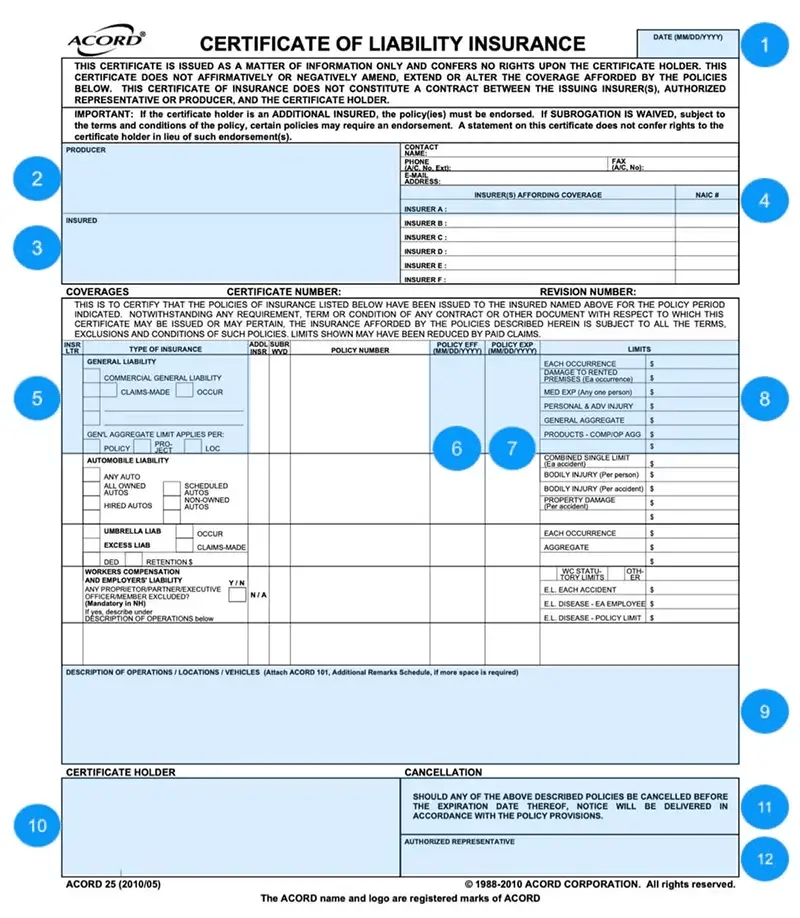
1. Date issued
The date in the top right corner is when the certificate was issued, not when coverage begins. A certificate issued today does not mean coverage started today. Check the policy effective date separately.
2. Producer
The insurance agent or broker who issued the certificate. If you have questions about coverage or need an endorsement, this is your contact. Do not go to the vendor, go to the producer.
3. Insured
The name and address of the policyholder. Confirm this matches the vendor or contractor you are working with exactly. Name mismatches create coverage disputes.
4. Insurers affording coverage
The carriers providing each policy are listed here as Insurer A, Insurer B, and so on. Each letter corresponds to a policy in the coverage section below. Check that the carriers listed are admitted and financially rated, an A.M. Best rating of A- or better is a common requirement.
5. Type of insurance and insurer letter
This section lists all coverage types: general liability, automobile, workers compensation, umbrella, and others. The insurer letter ties each policy back to the carrier listed above. Confirm every required coverage type is listed with an active policy.
6. Policy effective date
When coverage begins for each policy. A certificate submitted before the effective date means coverage has not started yet.
7. Policy expiration date
When coverage ends. This is the date your renewal tracking should be built around. Coverage that lapses between the expiration and renewal creates a gap, even a short one can leave you exposed on an active project.
8. Policy limits
The maximum amount the carrier will pay per occurrence and in aggregate for each coverage type. Compare these against your contract requirements. A limit that met your threshold last year may not meet updated requirements this year.
9. Description of operations, locations, and vehicles
This is the most important field on the certificate for compliance purposes. This is where additional insured status, primary and non-contributory language, and waiver of subrogation are noted. A certificate that does not reference these in this field, or that references them without the endorsement attached, is incomplete.
10. Certificate holder
The name of the organization that requested the certificate. Confirm your organization is listed correctly. An incorrect or outdated certificate holder name can complicate a tender.
11. Cancellation notice
This section states that the producer will attempt to notify the certificate holder if the policy is cancelled before expiration. Note the word "attempt", this is not a guarantee of notification. Do not rely on cancellation notices as your primary expiration tracking method.
12. Authorized representative signature
The signature of the broker or agent who issued the certificate. An unsigned certificate is not valid.
What the certificate does not tell you
The ACORD 25 has checkboxes for additional insured status and waiver of subrogation. A checked box means the certificate holder requested the notation. It does not confirm the endorsement exists on the policy.
The only confirmation that an additional insured endorsement, primary and non-contributory language, or waiver of subrogation is actually in place is the endorsement document itself. Compliance programs that stop at the certificate are missing the most important verification step.
For a full breakdown of the endorsements to collect and review alongside the certificate, see:
- Additional Insured Endorsements: What You Need to Know
- Primary and Non-Contributory: What It Means and Why It Matters
- Waiver of Subrogation: What It Is and Why Contracts Require It
Common errors to catch before approving a submission
Coverage limits below contract requirements. Check every limit against what the contract specifies, not against a generic threshold.
Expired policies. The expiration date on the certificate is not always current. A vendor may submit an old certificate. Check the date issued as well as the policy expiration.
Wrong insured name. The entity named as insured must match your contract. A DBA, parent company, or related entity is not the same as the contracted party.
Missing coverage types. If your contract requires professional liability or umbrella coverage and those lines are not on the certificate, the submission is incomplete regardless of what else looks correct.
Endorsements referenced but not attached. The description of operations field may note additional insured status or waiver of subrogation. Without the endorsement document, that notation is not verification.
If the manual review process feels like too much to maintain at scale, see 4 reasons teams automate COI tracking.
How PINS handles certificate review
PINS reviews submitted COIs against your requirements automatically. The AI Assistant checks limits, coverage types, expiration dates, and endorsement language, and flags gaps with evidence so your team knows exactly what is missing and where. Your team reviews the flag and approves, rejects, or requests a correction.
Nothing is auto-approved. The review is faster. The gaps are harder to miss.
Reading a COI manually takes time and leaves room for error. COI tracking software automates much of this review so your team isn't doing it line by line for every submission.
Evaluating software options? See how PINS compares to other COI tracking software.
Frequently asked questions
What is an ACORD 25 certificate of insurance?
The ACORD 25 is the standard form used for certificates of insurance in the United States. It summarizes a vendor's or contractor's insurance coverage in a standardized format, showing policy types, limits, effective dates, and the parties involved. Almost every COI you collect will use this form.
Does a certificate of insurance prove that endorsements are in place?
No. The ACORD 25 has checkboxes for additional insured status and waiver of subrogation, but a checked box only confirms the notation was requested. The endorsement on the policy is the only confirmation those protections exist. Always collect and review the endorsement documents alongside the certificate.
What should I check first when reviewing a certificate of insurance?
Start with the policy expiration dates to confirm coverage is active, then check the coverage types and limits against your contract requirements, then review the description of operations field for endorsement notations. If endorsements are noted, request the actual endorsement documents for verification.
What is the description of operations field on an ACORD 25?
The description of operations field is where brokers note project-specific coverage details, including additional insured status, primary and non-contributory language, and waiver of subrogation. It is the most compliance-relevant field on the form. If your required endorsements are not referenced here, the submission is likely incomplete.
Can a certificate of insurance be faked?
Yes. Fraudulent certificates are produced by altering legitimate forms or fabricating coverage that does not exist. The only way to verify that a certificate is legitimate is to confirm coverage directly with the carrier or through a platform that verifies against policy data. A certificate that looks correct is not proof that the underlying policy is active or meets your requirements.