Last updated: October 14, 2026
COI renewals do not fail because the process is complicated. They fail because nobody owns the follow-up until something expires.
Most teams discover a lapsed COI when it has already caused a problem: a payment hold, a site access issue, or an audit finding. By that point the vendor has been working without coverage for days or weeks and nobody noticed because the follow-up was manual, inconsistent, and spread across too many people's inboxes.
This post covers how to build a COI renewal process that does not depend on someone remembering to send an email.
Why renewals fall apart
Execution is where renewal programs break down.
Volume compounds. A team managing 200 vendors has 200 renewal cycles running at different points in the year. Some policies expire in March, some in October, some in the middle of a project. Tracking all of them in a spreadsheet works until it does not.
Follow-up is manual. Sending renewal requests, chasing non-responsive vendors, confirming the new certificate meets requirements, updating the record: all of it requires someone to do it. When that someone is busy, renewals wait.
Nobody owns the process. In most organizations, COI follow-up lands on whoever has time. That means the process is as consistent as the people doing it, which is not consistent at all.
Responses require review. A vendor who submits a renewed certificate is not done. The new certificate still needs to be checked against your requirements. If the vendor switched carriers or changed limits at renewal, the new certificate may not meet the standard of the old one. Manual programs rarely catch this.
The result: policies lapse, teams find out late, and the scramble to get a new certificate starts after the gap has already opened.
What a good renewal process looks like
Four things define a renewal process that works.
Advance notice. Send renewal requests thirty days out at minimum. For vendors with slow brokers or complex requirements, forty-five days gives more room to resolve issues before the policy lapses.
A follow-up sequence. One reminder is not enough. Vendors miss emails. Brokers have queues. The sequence should include at least two or three touchpoints before expiration.
Customized communication. A renewal email that goes out to every vendor the same way regardless of vendor type, project, or relationship is generic and easy to ignore. Renewal requests that reference the specific project, the specific policy, and the specific requirements get better response rates.
Documented follow-up. When a certificate does not arrive, someone needs to know. That person needs to be able to see what was sent, when, and what the vendor said. Without a documented follow-up trail, the renewal conversation starts over every time.
Most manual programs have some version of these components. The problem is execution. When follow-up depends on one person remembering to send emails on schedule, the sequence breaks the moment that person is busy.
How automated renewal tracking works
Automated renewal tracking removes the manual steps while keeping your team in control of the decisions.
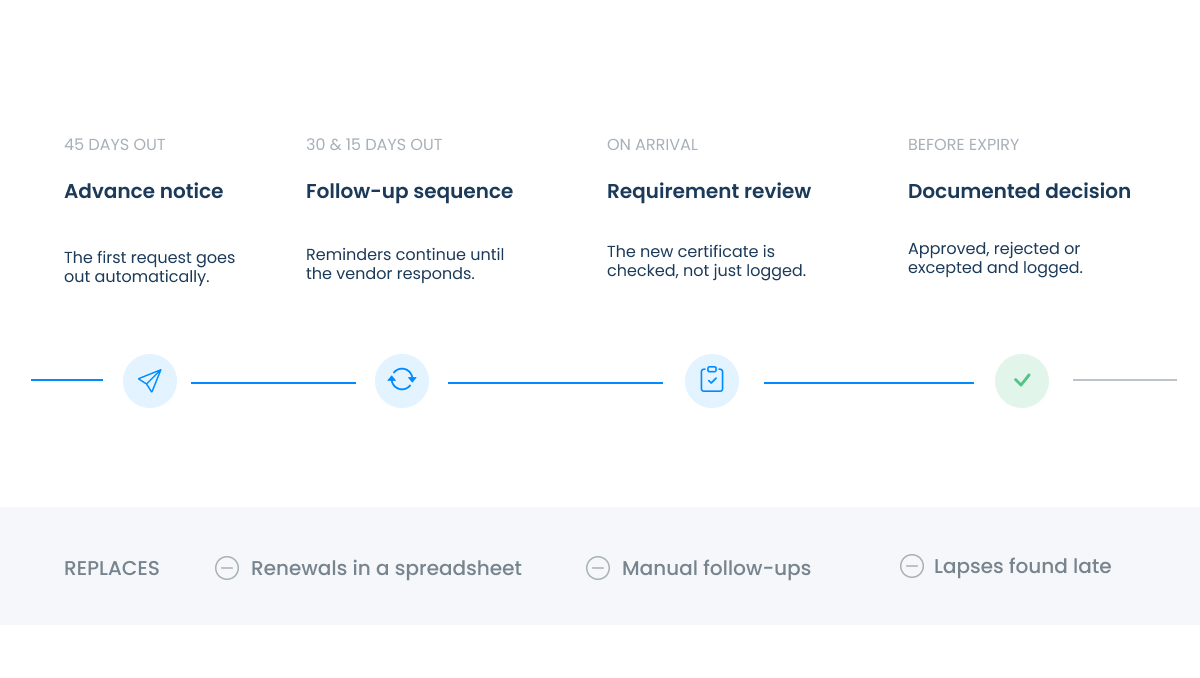
The system tracks every expiration date across every active vendor. When a policy approaches expiration, renewal requests go out automatically. If the vendor does not respond, follow-up reminders go out on a schedule you set. Your team gets notified when a renewal comes in and when a vendor does not respond after the final reminder.
The things that still require your team: reviewing the renewed certificate against your requirements, approving it, and handling any gaps or exceptions.
This is where the renewal process and the endorsement review process overlap. A vendor who renews their general liability policy at renewal may have changed carriers or adjusted their endorsements. A renewal that arrives with the right expiration date but the wrong endorsement language is a compliance gap that looks like a pass. Automated tracking that includes document review against your requirements catches this. Automated tracking that only logs expiration dates does not.
What to look for in renewal automation
For a full platform comparison, see Best COI Tracking Software in 2026.
A few things worth confirming before you choose a platform
Configurable timing. Can you set when the first request goes out and how many reminders follow? A platform that sends one request on a fixed schedule is not much better than a calendar reminder.
Customizable email language. Can you change what the request says by vendor type, project, or requirement? A renewal email that references the specific project and the specific policy creates urgency. A generic "your certificate is expiring" email does not.
Internal notifications. Does the system notify your team when a renewal comes in, when a vendor does not respond, and when a certificate is about to expire? Renewals should not land in a queue where nothing happens until someone checks.
Review against requirements. Does the platform check the renewed certificate against your requirements, or does it just log that a new certificate arrived? The difference determines whether you catch requirement gaps at renewal or discover them later.
Completed operations tracking. Does the platform track completed operations endorsements separately from active project COIs? Completed operations coverage needs to remain active through the tail period your contracts require, often two to five years after project completion. This is the most commonly overlooked renewal category.
For a full list of questions to ask vendors on renewal automation and every other evaluation category, download the COI Tracking Software Evaluation Checklist.
How PINS handles renewals
PINS tracks expiration dates across every active vendor and project. Renewal requests go out automatically at the intervals you configure. If a vendor does not respond, follow-up reminders continue on schedule. Your team gets notified when renewals arrive and when vendors go unresponsive.
You control the email language, the timing, and the notification triggers. The renewal emails can be sent from your company domain so they feel familiar to your vendors and brokers.
When a renewed certificate comes in, the PINS AI Assistant reviews it against your requirements and identifies anything that changed or does not meet the standard. Your team reviews the finding and approves, rejects, or grants an exception. The decision is logged.
Morley Builders reduced expired notice management from two days to five minutes. C.W. Driver handles expired notices in five minutes.
Book a Demo to see how PINS handles renewal tracking for your vendor volume.
Frequently asked questions
How do I manage COI renewals without chasing vendors?
The starting point is moving from reactive to proactive follow-up. Send renewal requests before policies expire, not after. Use a multi-touch follow-up sequence rather than a single request. Track what was sent, when, and what the vendor said. Most teams that stop chasing vendors have either automated the follow-up sequence or assigned clear ownership of each renewal cycle to a specific person. Automation is more scalable once vendor volume exceeds 50 to 100 active vendors.
How far in advance should I request a COI renewal?
Sixty days before expiration is a reasonable starting point for most vendors. This gives the vendor time to contact their broker, the broker time to process the request, and your team time to review and follow up if the certificate does not arrive or does not meet requirements. For vendors with a history of slow response, ninety days is worth considering. For very low-risk vendors with simple requirements, thirty days may be sufficient.
What happens when a vendor does not respond to a renewal request?
The follow-up sequence should continue regardless of vendor response. Most renewal programs that rely on a single request produce regular lapses because vendors miss emails and nobody sends a second one. A structured sequence of typically three touchpoints at decreasing intervals before expiration significantly reduces non-response rates. After the final reminder, your team should be notified so someone can make a direct call or send a personal email if the vendor relationship warrants it.
Does a renewed certificate need to be reviewed against requirements?
Yes, every time. A vendor who renews their policy at the same carrier with the same limits may still have changed endorsements, reduced coverage, or dropped a required form. A renewal that looks the same on the surface can still fail to meet your requirements. Reviewing the renewed certificate against your requirements is not an extra step. It is the step that makes the renewal process meaningful rather than just a record-keeping exercise.
How do I track completed operations endorsements at renewal?
Completed operations endorsements cover liability arising from work after a project closes. The coverage needs to stay active through the tail period your contracts require, often two to five years after project completion. At renewal, confirm the completed operations endorsement is still in place on the renewed policy, not just on the active project certificate. Most manual renewal programs do not track completed operations separately, which creates a compliance gap that surfaces at claim time rather than at renewal.