Last updated: September 15, 2026
Procore handles a lot of what a general contractor needs to manage a project. Subcontractor compliance is part of that picture. Understanding exactly what Procore does for COI tracking, and where the process still falls on your team, is the right starting point before adding any new tool to your workflow.
For commercial GC teams managing Procore alongside complex owner-specific requirements, see COI Tracking for Commercial General Contractors.
What Procore does natively for COI compliance
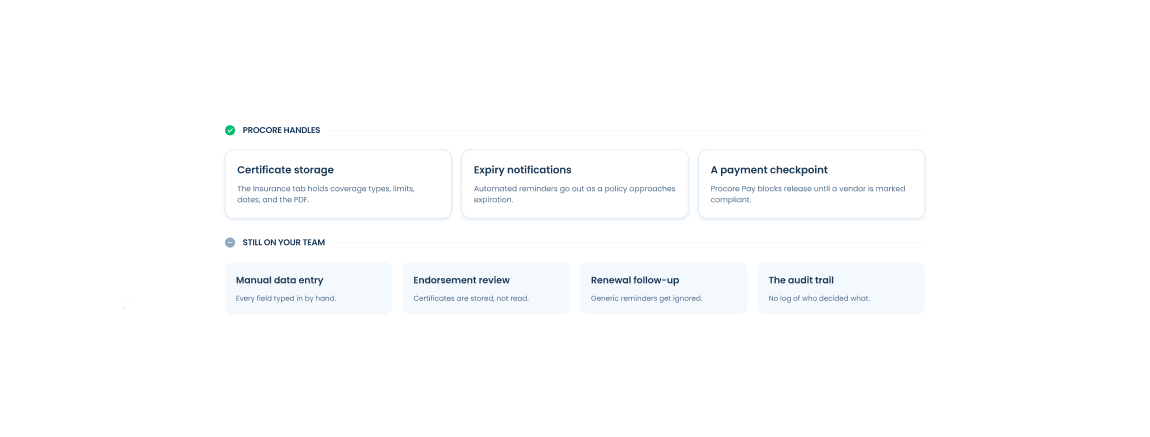
Procore has an Insurance tab in the Company Directory where your team can log certificate details manually. You can record coverage types, limits, expiration dates, and policy numbers, and attach the certificate PDF. When a policy approaches expiration, Procore can send automated notifications to your insurance manager and the vendor's primary contact.
If your organization uses Procore Pay, there is a Compliance tab inside each commitment contract where your team can manually mark a vendor as Compliant, Not Compliant, or Not Required before a payment is released. The toggle creates a visible checkpoint in the payment workflow.
For teams with low subcontractor volume and simple requirements, this may be enough. But most GCs managing active projects with multiple subcontractors and contract-specific endorsement requirements go beyond what Procore's native features cover.
The Insurance tab requires manual data entry
Every field in Procore's Insurance tab has to be populated by hand. Someone on your team enters the coverage types, the limits, the expiration dates, and the policy numbers. When a certificate comes in, it does not populate automatically. Because the entry is manual and time-consuming, the tab often goes unused or falls behind the actual certificates on file.
The compliance toggle in Procore Pay follows the same pattern. Someone sets it to compliant when they believe the sub is covered. The status reflects what your team entered, not the result of a document review. If nobody has reviewed the endorsement language or confirmed the certificate is current, the compliant flag is an assumption, not a verified status.
Renewal reminders come from a generic Procore address
Procore sends renewal notifications automatically, but they come from a no-reply Procore system address. Subcontractors receive dozens of automated notifications from Procore every week: schedule updates, RFI responses, submittal notifications, payment notifications. Insurance renewal reminders arrive in the same inbox with the same sender and the same visual treatment as every other Procore notification. They get ignored at a high rate.
The timing and messaging are fixed. Every subcontractor gets the same reminder at the same interval, regardless of vendor relationship, project type, or how responsive that vendor typically is.
Procore does not verify endorsement language
Procore stores certificates. It does not read them. When a subcontractor uploads a COI through Procore, the document sits in the file. Whether the additional insured endorsement uses CG 20 10 or CG 20 37, whether the waiver of subrogation covers both GL and workers comp, whether the primary and non-contributory language is present in the endorsement document, none of that is checked. That review still falls on your team manually, and on most projects it does not happen at all.
A certificate that shows correct limits and coverage types can still fail to meet your contract requirements at the endorsement level. Procore cannot catch that. Your team has to.
There is no audit trail for compliance decisions
When a compliance decision is made; approving a submission, granting an exception, accepting a waiver; Procore does not log who made that call, when they made it, or what they reviewed. If an owner or auditor asks for documentation showing that a specific subcontractor was compliant during a project, you are searching through emails and shared drives to reconstruct a record that was never systematically kept.
What most teams do
Teams that go beyond Procore's native COI features typically fall into one of three patterns.
They manage COI tracking in a spreadsheet alongside Procore. Someone owns the spreadsheet, tracks expirations, sends renewal emails manually, and updates Procore's Insurance tab when they have time. This works until the spreadsheet owner gets busy or the subcontractor roster grows past what one person can manage.
They rely on Procore's compliance flag and do not look deeper. The flag is set to compliant when a certificate comes in, regardless of whether anyone reviewed the endorsements. The program looks functional but the underlying review is incomplete.
They connect a dedicated COI tracking tool to Procore. The tool handles collection, endorsement review, renewal follow-up, and compliance documentation. It writes compliance status back to Procore automatically so project teams see current status in the system they already use.
How a Procore integration extends COI tracking
A native Procore integration for COI tracking eliminates the manual data entry problem entirely. Subcontractor and commitment data flows from Procore into the COI tracking tool automatically. When a certificate is reviewed and approved, compliance status writes back to Procore in real time. Nobody enters data by hand.
Renewal reminders go out from your company's domain with messaging your team controls. The email looks like it came from your organization, not from a Procore system address. You set the timing, the content, and the follow-up sequence. Response rates are significantly higher than generic platform notifications.
Endorsement language is reviewed against your contract requirements automatically. Additional insured status, primary and non-contributory wording, and waiver of subrogation are all verified in the endorsement documents, not inferred from a checkbox on the certificate. If the language does not meet your requirements, the submission is returned with the specific finding before anyone approves it.
Every compliance decision is logged with a timestamp and the name of the person who made it. The audit trail builds automatically as the work happens rather than after the fact.
How PINS connects to Procore
PINS integrates natively with Procore. Commitments flow from Procore into PINS automatically. Vendors and brokers submit certificates and endorsements through a secure upload link with no Procore login required. The PINS AI Assistant reviews each submission against your configured requirements and returns findings with evidence linked to the specific language in the document. Your team reviews the result and makes every compliance decision.
Compliance status flows back into Procore in real time, tied to each commitment. Project managers see current status in the embedded PINS side panel across Procore without logging into a separate system.
For a full walkthrough of how the integration works, see How the PINS and Procore Integration Works.
For a full list of questions to ask any COI tracking software vendor before you buy, download the COI Tracking Software Evaluation Checklist.
Frequently asked questions
Does Procore have COI tracking built in?
Yes, partially. Procore has an Insurance tab on vendor and commitment records where certificate details can be logged manually, a compliance flag that can be set on subcontractor records, and automatic renewal reminders. The tab requires manual data entry to populate, renewal reminders come from a generic Procore system address that subcontractors frequently ignore, and Procore does not verify endorsement language against contract requirements. Teams that need endorsement review, branded renewal reminders, or an audit trail of compliance decisions typically connect a dedicated COI tracking tool to Procore.
Can Procore send COI renewal reminders?
Yes. Procore sends renewal reminders automatically when certificates approach expiration. The reminders come from a no-reply Procore system address and use fixed messaging you cannot customize. Subcontractors who receive high volumes of Procore notifications often miss the insurance reminders because they look identical to every other automated Procore notification. COI tracking software connected to Procore sends renewal reminders from your company's domain with messaging you control, which significantly improves response rates.
Does Procore verify endorsement language on certificates of insurance?
No. Procore stores certificates but does not read or verify the endorsement language inside them. Whether the additional insured endorsement uses the right ISO form, whether the waiver of subrogation covers both GL and workers comp, and whether the primary and non-contributory language is present in the endorsement document are all things your team has to verify manually. COI tracking software with AI-assisted review reads the endorsement documents against your contract requirements and returns findings before anyone approves the submission.
What is the best COI tracking software for Procore users?
The best COI tracking software for Procore users integrates natively so commitment data flows in automatically and compliance status writes back in real time. Key features to look for: automatic data sync from Procore commitments, branded renewal reminders your team controls, endorsement language verification against contract requirements, an embedded compliance view inside Procore for project managers, and a logged audit trail of every compliance decision. PINS integrates natively with Procore and covers all of these. See the Procore integration page for details.
How does COI tracking software connect to Procore?
COI tracking software connects to Procore through the Procore App Marketplace. Once connected, commitment and vendor data flows from Procore into the COI tracking tool automatically. When a certificate is reviewed and approved, compliance status writes back to Procore in real time, tied to the commitment record. Project managers see current compliance status inside Procore without logging into a separate system. The integration eliminates the manual data entry that Procore's native Insurance tab requires.