
Last updated: November 5, 2026
To read a certificate of insurance, check five things: who is insured, which policies are listed, the limits, the policy dates, and what the Description of Operations box says. Then confirm any required endorsements with the endorsement pages, because the certificate itself does not change the policy.
Most COIs use the ACORD 25 form, so the fields below sit in the same place on nearly every certificate you receive. The numbers match the labeled form. If you just need the list, skip to the COI review checklist.
What the ACORD 25 is, and what it is not
The ACORD 25 is the standard certificate of liability insurance in the United States. The vendor's broker fills it out from the vendor's policies. For the basics of how certificates work, see What Is a COI?
The box at the top of the form matters more than it looks. It says the certificate is issued as a matter of information only, confers no rights on the certificate holder, and does not amend, extend, or alter the coverage. It also says that if you are an additional insured, the policy must be endorsed. The certificate summarizes the coverage. The policy and its endorsements are the coverage.
The ACORD 25, field by field
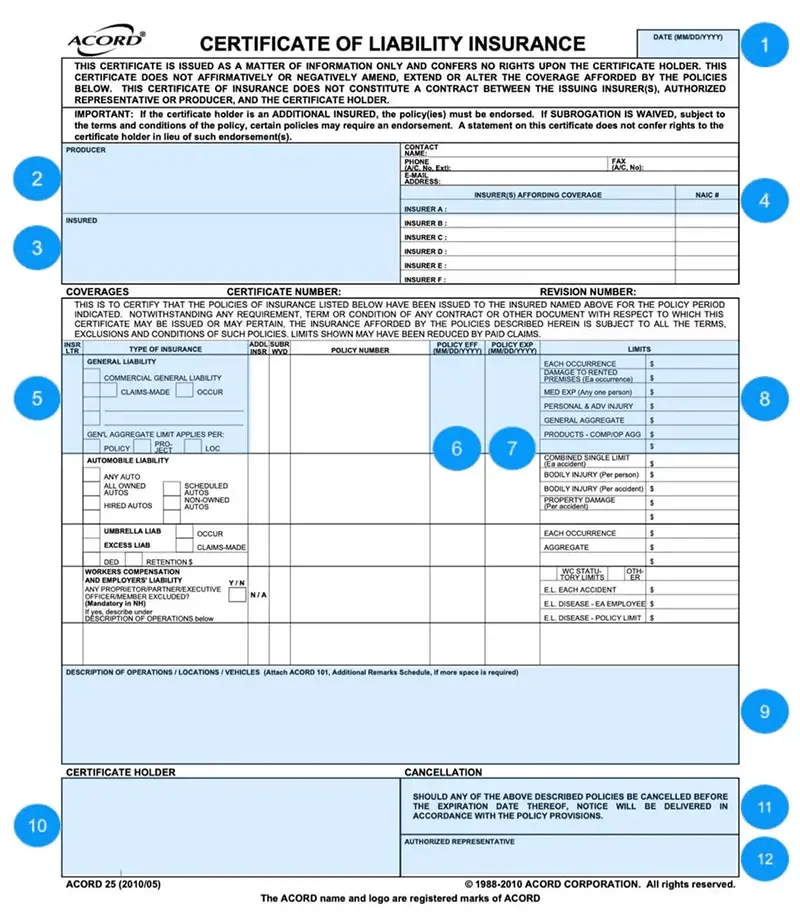
1. Date
The date the certificate was issued, not the date coverage starts. Check: an old date can mean an old certificate. If the policies have renewed since, ask for a current one.
2. Producer
The broker or agent who issued the certificate. Check: this is who to contact for corrections or endorsement copies, not the vendor.
3. Insured
The vendor's legal name and address. Check: it matches the party on your contract exactly. A parent company, DBA, or related entity is not the same party.
4. Insurers affording coverage
Each carrier gets a letter (Insurer A, B, C) and its NAIC number. Check: the carriers meet your rating requirement, often A.M. Best A- VII or better. Some contracts also require admitted carriers.
5. Type of insurance
Each coverage line, with its insurer letter, policy number, and two narrow columns: ADDL INSD (additional insured) and SUBR WVD (subrogation waived). Check: every coverage your contract requires is listed, and the right boxes are marked. A marked box means the broker is indicating the endorsement is on the policy. It does not show the wording or confirm it covers you. See what to check on each coverage line.
6. Policy effective date
When each policy starts. Check: coverage is in force before work begins.
7. Policy expiration date
When each policy ends. Check: each policy runs through the work, or you have a plan to collect the renewal. Build your renewal tracking around these dates.
8. Limits
The most the carrier pays per occurrence and in aggregate on each line. Check: each limit against your contract, not a generic threshold. An umbrella can make up the difference only if your contract allows it.
9. Description of operations
Free text where the broker notes the project, additional insured status, primary and non-contributory wording, and waiver of subrogation. Check: the notes match your requirements, then request the endorsements they reference. Primary and non-contributory has no checkbox on the form, so this box is usually the only place it appears.
10. Certificate holder
Your organization's name and address. Check: it is correct. Being the certificate holder gets you a copy of the certificate, not coverage.
11. Cancellation
The form says notice of cancellation "will be delivered in accordance with the policy provisions." Most policies only require notice to the named insured, so you may not hear about a cancellation at all. Check: do not rely on this box. Track expiration dates yourself, and require a notice of cancellation endorsement in your contract if you need notice.
12. Authorized representative
The broker's signature, often electronic. Check: it is present. If it is missing, ask the producer for a signed copy.
What to check on each coverage line
Field 5 holds most of the details reviewers miss.
General liability
- Occurrence or claims-made. Most contracts require occurrence.
- "Gen'l aggregate limit applies per." Policy, project, or location. Per project keeps the vendor's other jobs from using up the limit available to yours.
- Products-completed operations aggregate. Required if your contract calls for completed operations coverage.
Automobile liability
- Any auto, owned, hired, or non-owned. Any auto is the broadest. A vendor with only hired and non-owned autos has no coverage on vehicles it owns.
Umbrella or excess
- Occurrence or claims-made, and the retention.
- What it sits over. The certificate does not show which policies the umbrella covers. If that matters, ask for the schedule of underlying insurance.
Workers compensation and employers liability
- "Per statute" box and employers liability limits. Each accident, disease each employee, and disease policy limit.
- Owner exclusion. "Y" next to "any proprietor/partner/executive officer/member excluded" means owners are not covered. That matters for small subcontractors where the owner does the work.
- SUBR WVD. Marked if your contract requires a waiver of subrogation.
What the certificate cannot tell you
The certificate cannot show endorsement wording, whether you meet the endorsement's conditions, or whether a policy was cancelled after the certificate was issued. For each required endorsement, request the endorsement page and review the wording against your contract:
- Additional Insured Endorsements: CG 20 10 and CG 20 37 Explained
- ISO Additional Insured Forms: CG 20 11, 20 12, 20 15, 20 18
- CG 20 01: Primary and Non-Contributory Meaning Explained
- CG 24 04 and WC 00 03 13: Waiver of Subrogation Forms
COI review checklist
Use this before approving any certificate:
- The insured name matches the party on your contract.
- Every required coverage line is listed.
- Each limit meets your contract.
- Each policy is in force for the work, with expiration dates tracked.
- Carriers meet your rating requirement.
- General liability is occurrence-based, with the aggregate your contract requires.
- Auto covers the vehicles the vendor uses.
- Workers comp shows "per statute," with no owner exclusion that affects the job.
- ADDL INSD and SUBR WVD are marked where required.
- Description of Operations matches your requirements.
- Endorsement pages are collected and the wording is reviewed.
- Your organization is listed correctly as certificate holder.
How PINS handles certificate review
PINS reviews each COI and endorsement against your requirements: coverage types, limits, dates, and endorsement wording. It identifies issues and links its reasoning, so your team can see what was checked and what is missing. Your team makes the final compliance decision. Nothing is auto-approved.
If reviewing certificates line by line is taking over someone's week, see how COI tracking software handles it, or how PINS compares to other options.
Frequently asked questions
What is an ACORD 25 certificate of insurance?
The ACORD 25 is the standard certificate of liability insurance form in the United States. A broker fills it out to summarize a vendor's policies, limits, and dates. It is informational only and does not change the policy.
Does a certificate of insurance prove endorsements are in place?
No. A marked ADDL INSD or SUBR WVD box means the broker is indicating the endorsement is on the policy, but it does not show the wording or confirm it covers you. Request the endorsement pages and review them against your contract.
What should I check first on a COI?
Start with the insured name and the policy dates, then compare coverage types and limits to your contract. Then read the Description of Operations box and request any endorsements it references.
Will I be notified if a vendor's policy is cancelled?
Not necessarily. The ACORD 25 says notice will be delivered in accordance with the policy provisions, and most policies only require notice to the named insured. Track expiration dates yourself, and require a notice of cancellation endorsement in your contract if you need notice.
Can a certificate of insurance be faked?
Yes. Certificates can be altered or made up entirely. Warning signs include mismatched fonts, missing policy numbers, and dates or limits that look edited. If something looks off, confirm coverage with the producer, using contact details you look up yourself rather than the ones on the certificate.